Choose a named server library
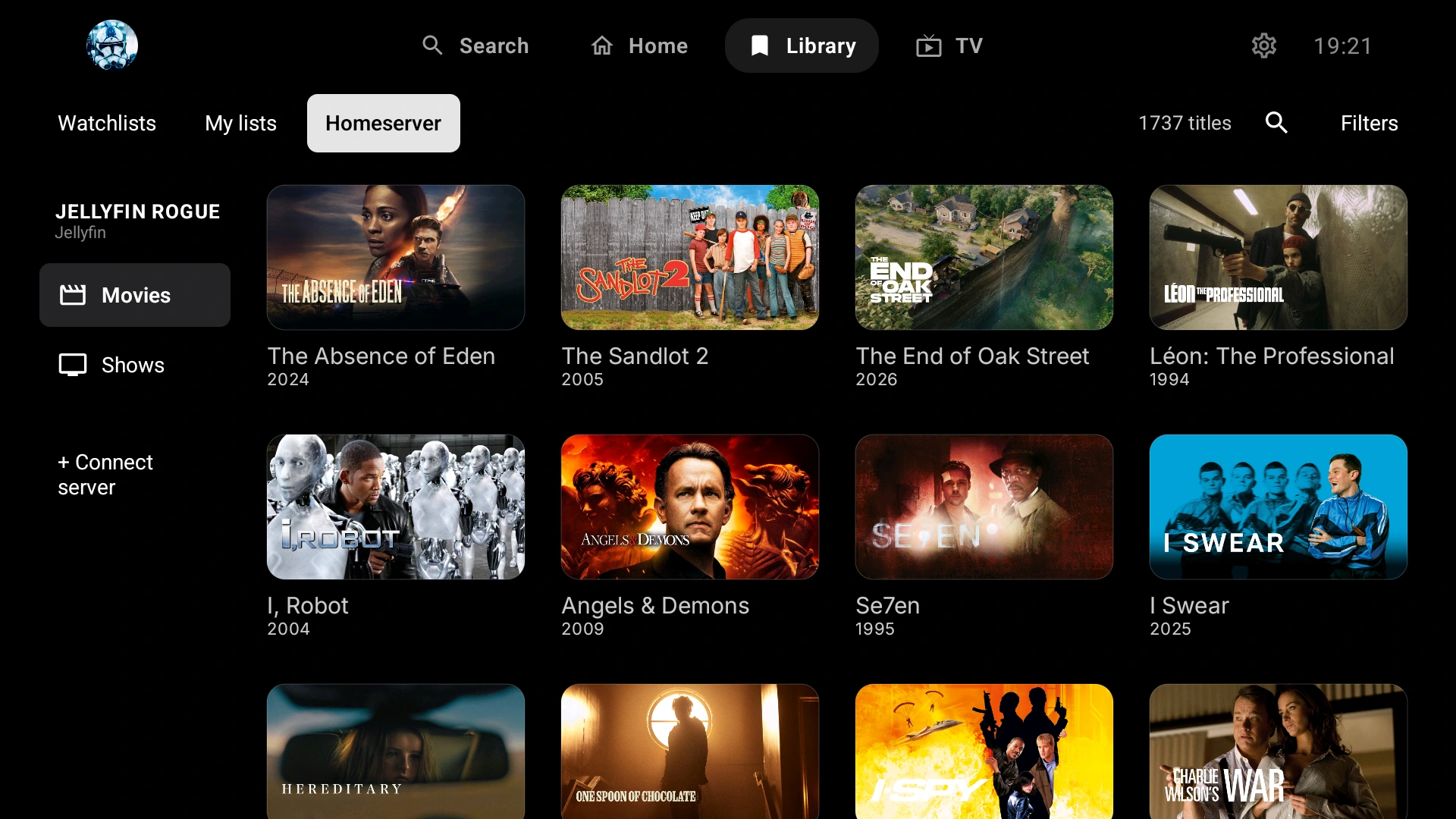
In Library → Homeserver, choose the library belonging to the server you want. Names help distinguish, for example, a local Jellyfin movie library from a shared Plex movie library.

Multiple media servers · One client
Use ARVIO to access your Plex, Emby and Jellyfin libraries without changing server software or moving your files. Save each connection, give it a recognizable name and browse its libraries from the same Android TV, Google TV or Android mobile app.
Updated 5 October 2026 · By the ARVIO project
Android TV, Google TV and Android mobile
Install ARVIO from Google Play or the official APK release. You need an account authorized to access each server and an address the device can reach. Prefer HTTPS and include any required port or reverse-proxy base path.
Open Settings → Home Server → Add server. Enter an optional Server name, the Server URL, Username and your password in Password / token. Alternatively, choose Connect with code, enter the Jellyfin URL and approve the code from a signed-in Jellyfin client. The Jellyfin Android TV guide explains the full flow.
Choose Settings → Home Server → Add server and enter the Emby server URL and your account credentials. ARVIO detects the server from its address. The Connect with code flow does not support Emby; use this form instead.
Choose Settings → Home Server → Connect with code. You can leave Server URL empty for Plex discovery, or enter a preferred Plex server address. Follow the displayed activation instructions on your phone or computer and sign in to the Plex account with access to that server. Wait for ARVIO to finish connecting.
Open Library → Homeserver and choose a library from the connected server. Play a known title before adding more servers. Settings → Home Server → Test connection checks whether this profile can reach its saved servers.
These are client connections, not server installations. Manage users, sharing, file locations and library scans in Plex, Emby or Jellyfin itself.
Separate libraries, familiar controls
ARVIO provides a common interface for connected servers. It does not combine their databases or change which titles an account is allowed to access.
In Library → Homeserver, choose the library belonging to the server you want. Names help distinguish, for example, a local Jellyfin movie library from a shared Plex movie library.
Search the selected library or open Filters. Sort options include Recently added and Title A-Z; Refresh reloads the library. Clear active filters if expected titles are missing.
Available playback sources can carry a server label and media details. When multiple versions are returned, choose the one suited to your device. Source availability still depends on permissions and title matching.
A server connection is not a promise of identical watched state across every client. Optional ARVIO Cloud, Trakt and Simkl integrations have their own roles; test the resume and tracking behavior your setup needs.
Browser companion
In the web app, open Settings → Home Server, choose Jellyfin / Silo, Emby or Plex, and enter a name and server URL. Use the following credentials, click Test, then Add to save a working connection.
| Server | Credentials in the web form |
|---|---|
| Jellyfin or Emby | An authorized API token or the server username and password. The Android code-sign-in instructions do not describe this web form. |
| Plex | An X-Plex-Token is required. Keep it private: it is an access credential, not a public share link. The web form does not offer the Android Plex PIN flow. |
Hosted web requests cannot use the metadata proxy to reach private LAN addresses. If you self-host for a local server, follow the network and authentication guidance in the self-hosting documentation. Browser media support, cross-origin restrictions and HTTPS still matter.
For device support, local storage and hosting choices, read the ARVIO Web guide. The free Android app does not require Premium; optional managed web hosting and independent self-hosting are separate choices.
Practical answers
Yes. ARVIO supports multiple saved home-server connections. Add each server separately and choose its library in the Library screen. Each server keeps its own files, accounts, permissions and library organization.
No automatic cross-server library deduplication is promised. You browse identifiable server libraries, and matched titles can have multiple source choices. ARVIO does not move files or combine the servers into a new shared database.
Check the complete server URL, port, any base path and the credentials for that server. Android supports Plex PIN and Jellyfin Quick Connect through Connect with code; Emby uses the username-and-password form. The web form differs: Plex requires an X-Plex-Token, while Jellyfin and Emby accept a token or username and password.
Check that the same account can play the item in the server's own client. Then check the media URL, network, codecs, audio and subtitles on the ARVIO device. Try another available media version. A working metadata connection does not guarantee direct play or automatic transcoding.
The hosted metadata proxy blocks private LAN addresses. A secured, self-hosted ARVIO Web installation has a documented private-network option, but browser HTTPS, cross-origin and codec restrictions still apply. Do not disable server authentication or expose an unrestricted proxy to solve a connection problem.
No. The Android app is free. Premium is optional managed ARVIO Web hosting, not a requirement for the Android server connection. You must supply your own authorized server access and any separate services or subscriptions you choose to use.
Still need help? Ask in the ARVIO Discord with your app version, device, server type and error. Keep passwords, tokens and private URLs out of public posts.