Browse and filter your libraries
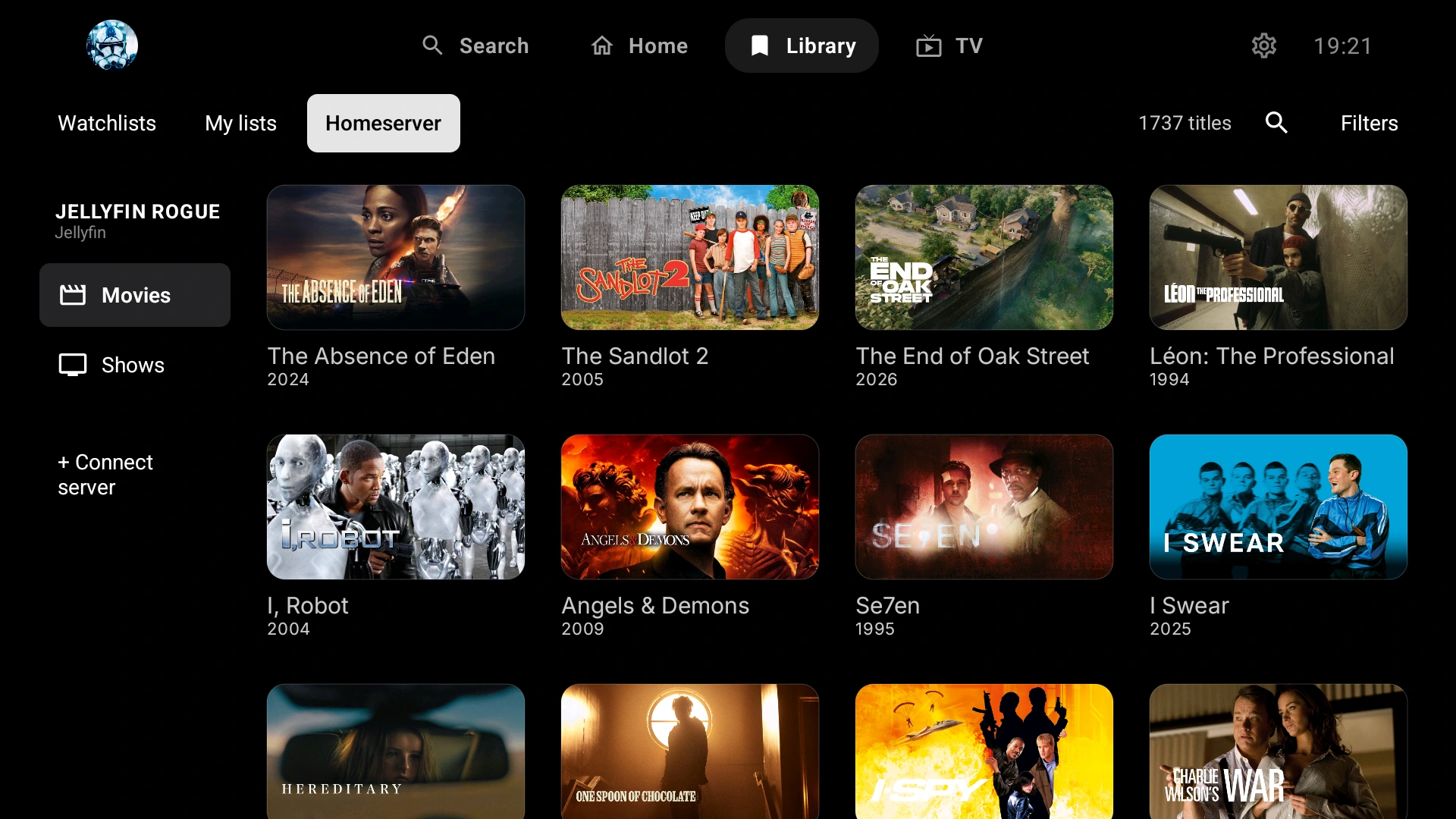
Open Library → Homeserver, choose a server library, search its titles and use Filters for sorting or movie and series filters. Recently added and Title A-Z are available sort options.

Free Android TV & Google TV client
Looking for an alternative way to use Jellyfin on your TV? ARVIO connects to your existing server, lets you browse its movie and series libraries, and offers one interface for Jellyfin alongside Plex, Emby and compatible addons. Your server still holds your files and controls access.
Updated 5 October 2026 · By the ARVIO project
An alternative client, not a new server
Try ARVIO if you want to browse a Jellyfin library in the same Android app as other media sources. There is no need to migrate the library or replace your Jellyfin installation.
Open Library → Homeserver, choose a server library, search its titles and use Filters for sorting or movie and series filters. Recently added and Title A-Z are available sort options.
Add more than one connection and give each a recognizable name. Jellyfin, Plex and Emby libraries stay identifiable rather than becoming one merged server. See the multi-server setup guide.
ARVIO can present separate source choices when the server returns multiple files or versions for a title. Available quality, container and file details depend on the server's response.
You can also configure compatible addons or Trakt and Simkl. These are optional connections, not included media subscriptions or a guarantee of complete Jellyfin synchronization.
Step by step
Have your server address and a Jellyfin account ready. Use an account permitted to access the libraries you want. These instructions also apply to ARVIO on Android phones and tablets; the layout adapts to the device.
Use Google Play or the official GitHub APK on a compatible Android TV or Google TV device. The Android TV installation guide covers installation and first-time setup.
Use the full Jellyfin address, including its port and any reverse-proxy base path. For a local connection, the TV must be able to reach that network. Use HTTPS where possible; an HTTP connection is not encrypted.
Enter an optional Server name, the Server URL, your Jellyfin Username and your password in Password / token. ARVIO detects the server from its address. Confirm the form and wait for the connection result.
Choose the Jellyfin library you want to browse. If several servers are connected, check the server name as well as the library name. Use search or Filters to find a known movie or series.
Open the title and choose the source returned by your server. If several versions are offered, select one your device can play. Check picture, audio and subtitles with your own media; successful login alone does not establish playback compatibility.
In Settings → Home Server, choose Connect with code and enter your Jellyfin Server URL. Keep the generated code visible. On a phone or computer already signed in to that Jellyfin server, open Settings → Quick Connect and approve the code.
Quick Connect must be enabled on the server. Do not leave the server URL blank: ARVIO uses the blank-URL code flow for Plex instead. If the code expires or your administrator has disabled this feature, use the username-and-password method above. See Jellyfin's Quick Connect documentation for the server-side steps.
Compatibility and troubleshooting
Yes. ARVIO is a free, open-source Android client that can connect to a Jellyfin server, alongside other supported sources. It is an independent project, not the official Jellyfin app. You still need your own server access and media; Premium hosting is not required for the Android app.
Check that you entered the Jellyfin server URL in ARVIO and that Quick Connect is enabled on that server. Approve the current code from an already signed-in Jellyfin client. If the code has expired, generate a new one. You can also use Add server with your Jellyfin username and password.
Open Library → Homeserver and select the correct server library. Check that your Jellyfin user can access it in Jellyfin itself, clear search or type filters, and use Filters → Refresh. If the connection is unavailable, check Settings → Home Server → Test connection and confirm that the server address is reachable from the TV.
No. Playback depends on the media version, video and audio codecs, subtitles, network, device and server response. A successful library connection does not guarantee playback. Try a compatible version and compare the same item in Jellyfin's own client; ARVIO is not a transcoding server.
ARVIO Web also supports Jellyfin connections, but browser setup and playback differ from Android. The hosted metadata proxy blocks private LAN addresses. A secured self-hosted installation has separate network options; browser HTTPS, cross-origin and codec restrictions still apply.
Do not assume complete two-way Jellyfin watched-state and resume-position sync across Android, web and other clients. Server connections, ARVIO Cloud and optional Trakt or Simkl tracking are separate integrations. Check the behavior you need with your own devices before relying on it.
For help, share the app version, TV model, server version and error in the ARVIO Discord or GitHub issues. Remove passwords, access tokens and private server addresses from logs and screenshots.
Related guides
The Android app is free and open source. Bring your own server and media.