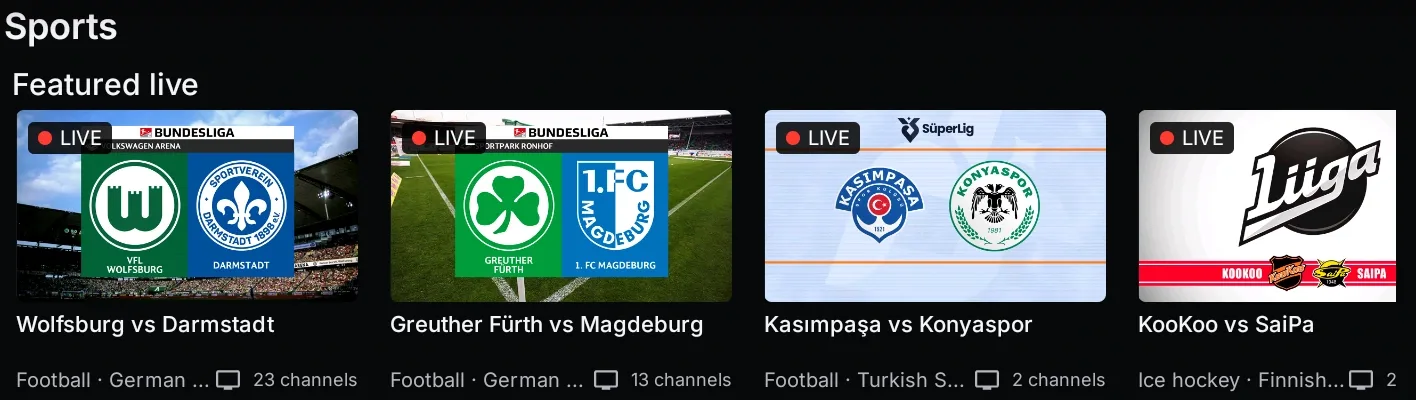
Featured live
Big matches that are on right now, with the league, the sport and how many of your channels carry it.

Live TV · Sports
ARVIO reads the sports schedule and checks it against the program guide of your own live TV channels. You get one clear page with what is live now, what is coming up and which of your channels shows it. ARVIO does not stream sports itself.
Updated 26 November 2026 · By the ARVIO project
How it works
Fixtures, kick-off times and artwork from public sports data (TheSportsDB and league schedules).
The EPG from your own TV provider says which channel shows what, and when.
ARVIO matches the two and shows each game with the channels that carry it. Pick a channel and you are watching.
Before you start
Add the M3U playlist, Xtream login or portal your TV or internet provider gives you, under Settings → TV. Many pay-TV and sports subscriptions offer this for use in your own player. Live TV setup guide.
Matching needs to know what is on. Most providers include an EPG; if not, add their XMLTV address in the same settings. Without a guide ARVIO can only match on channel names, which is less precise.
An add-on from a service you subscribe to, or one with official free streams, can list events directly. A Popular Live Sports row then also appears on Home.
Official broadcasters, league passes and your TV subscription give you a stable picture when it matters. “Free” sports playlists and add-ons are the ones that freeze at kick-off, disappear mid-season or come with malware. ARVIO does not support or recommend them.
Find your match
Open the TV tab and choose Sports.
Big matches that are on right now, with the league, the sport and how many of your channels carry it.
Your channels that are showing sport at this moment, grouped by sport.
What starts later today and tomorrow, with the kick-off time in your own time zone.
Open a game to see every matching channel. Guide match means the channel's guide lists this game; Possible broadcast means the channel usually carries this league. Some official sources say Opens in browser, because the rights holder only allows playback on their own site.
Scores stay hidden until you choose Show score, so you can watch a game later without seeing the result.
Troubleshooting
Old or missing EPG data is the main reason games do not match. Refresh the guide in Settings → TV and check that it covers today and tomorrow.
A guide that belongs to your playlist matches far better than a generic one, because the channel IDs line up.
The first time, ARVIO reads the full schedule and your guide. You will see Reading sports schedule while it works.
Being worked on
Sports is one of the most-used parts of ARVIO, and it is getting a big update in stages:
This guide is updated as each part ships.
Common questions
No. ARVIO shows the schedule and matches it to channels you already have through your own TV provider or add-ons. It does not provide any channels or streams.
ARVIO found the schedule but none of your channels lists those games in its program guide. Check that you added live TV with an EPG, refresh the guide, and remember that your subscription may not include those competitions.
To avoid spoilers. Choose Show score on a game when you want to see it.
Some official sources only allow playback on their own website. ARVIO opens that page instead of trying to play it in the app.
No. Kids profiles hide Live TV, and Sports is part of Live TV.
Your pay-TV or internet provider's TV package, official league and broadcaster streaming services, and free-to-air broadcasters. Several providers let subscribers use their channels in a player of their choice; ask yours.
Ask in the ARVIO Discord. Mention your device, the ARVIO version (shown under Settings → Accounts) and the exact message you see. Never share passwords, access tokens or private addon or playlist URLs.
Back to all guides · New here? Read how ARVIO works.